
Learning Objectives
By the end of this lecture you should be able to:
- Define conditionals
- Identify and use some of the conditionals
- Describe loops
- Identify various loops
Conditionals

This conditional is used to test two conditions:
If (x = 10){
//do this
}
else{
//do this
}
Exercise
- Declare a variable ‘num’
- Write a statement that checks if an ‘num’ is positive or negative
Exercise
change the value of the variable save & open it again
Exercise
You are tasked with setting up the security for a web site that only grants users over the age of 18+ access to the site. Write a conditional that gives users who are 18+ access and logs access denied for users who do not meet the given condition.
Nested if/else
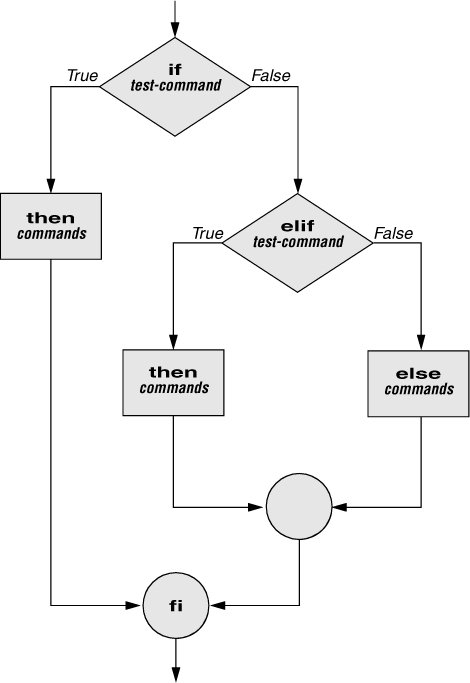
Is used to test more than just two conditions Structure looks like this:
If (true){
		if(true){
		//Do this
} else{
	//do this
  }
} else{
//do this
}
Exercise
- Write a nested if/else statement
- Declare a variable ‘num’
- Add an if/else statement that checks if ‘num’ is positive & greater than 100
- Add another statement that checks if ‘num’ is positive but less than 100
- Add an the final statement to check if ‘num’ is negative
Exercise
What is your letter grade?
Write an if/else statement for the following requirements:
- If student gets 90 or higher: console log A
- If students get 80 or above: console log B
- If students get 70 or above: console log C
- If students get 55 or above: console log D
- Any grade lower than 55 is F
Loops

A sequence of instructions that are repeated for either certain number of times or until a condition is met
For Loop Structure
The for loop has the following syntax:

- Statement 1 is executed before the loop (the code block) starts
- Statement 2 defines the condition for running the loop (the code block)
- Statement 3 is executed each time after the loop (the code block) has been executed.
For Loop Structure
- This for loop iterates from 0 to 9.
For Loop
Replace var/let for const
- see what happens?Exercise
Write a for loop that counts down from 10 to 1.
Exercise
Write a for loop for the given output: 1, 3, 5, 7, 9 2, 4, 6, 8, 10
Exercise
create a loop that outputs multiples of 3 starting at 6 ending at 60.
Exercise
Write a for loop for the given output:
#
##
###
####
#####
######
#######
Remainder Operator - %
The remainder operator (also known as modulo) returns the remainder left over when one operand is divided by a second operand. It always takes the sign of the dividend.
4 % 3
returns 1
20 % 2
returns 0
20 % 9
returns 2
Print even numbers
- Using the remainder % operator, write a for loop that iterates between 0 and 10 and prints all even numbers.
Exercise
Write a for loop that iterates from 1 - 20. Prints “prime” for all prime numbers, “even” for all even numbers, and “odd” for all odd numbers.
- Treat 2 as an even number and 1 & 3 as odd
JavaScript Arrays
The Use Case (What & Why) of Arrays
-
What are Arrays?
- Technically, arrays in JS are objects
- Arrays are "list-like" objects with keys of "0", "1", etc
- They contain zero or more items called - elements (not to be confused with HTML elements)
- Each element in an array can hold any data type including objects, functions, even other arrays
- Unlike objects, their items are considered to be ordered
- It is a best practice to name array variables plurally, e.g.,
let colors = ['red', 'green', 'blue'];
-
Why use Arrays?
- Arrays are the data structure of choice for holding lists of data
- Without complex data types such as arrays or objects, we'd have to store every individual piece of data in separate variables resulting is lots of messy code
Creating Arrays
-
There are two ways to create an array...
// using a Class/Constructor Function (less common syntax) let nums = new Array(2, 4, 18); // using Array Literal syntax (recommended best practice) let nums = [2, 4, 18]; - The best practice is to use the Array Literal syntax because it's more concise and the Class approach behaves differently if you pass only one argument
Creating Arrays - Exercise (2 mins)
- Create an array consisting of three of your favorite movies (strings) and assign it to a variable named
movies
Accessing Elements in an Array
-
We access elements in an array using square bracket notation, passing in the "index" (position) of the element you want to access:
let movies = ['Caddyshack', 'Interstellar', 'Scarface'];
let firstMovie = movies[0];  // 'Caddyshack'
Since when is
0the first item in anything? Since computer science came along!
Internally, programs prefer to think in terms of "offsets" in memory. Thus, we access the first item using an offset of zero - arrays are "zero-based" in JS.
-
We can add elements to the end of an array using the
pushmethod:movies.push('Trading Places', 'Antitrust');Note that more than one element can be added at a time.
-
We can also add to the front of an array with
unshift:movies.unshift('Star Wars');
Removing Elements from an Array
-
We can remove a single element from the end of an array using the
popmethod:let movie = movies.pop(); -
We can also remove from the front of an array with
shift:movie = movies.shift(); popandshiftonly remove one element at a time and don't take any arguments
Remembering unshift & shift
push&popare easy to remember, butunshift&shiftare not so clear-
Maybe this will help you remember:
The "longer" named methods do the same thing (add to an array)
unshift -> [...] <- push

The "shorter" named ones remove
shift <- [...] -> pop
Add/Remove Elements to/from Anywhere in the Array
- The Array.prototype.splice method is capable of adding and/or removing any number of elements to/from an array with a single line of code!
splicehas a syntax of:array.splice(start, deleteCount, newItem1, newItem2...)
Examples of adding/removing elements with splice:
movies => [ 'Caddyshack', 'Interstellar', 'Scarface', 'Trading Places' ]
let removedMovies = movies.splice(3, 1, 'Spaceballs', 'Alien');
movies => [ 'Caddyshack', 'Interstellar', 'Scarface', 'Spaceballs', 'Alien' ]
removedMovies = movies.splice(0, 3);
movies => [ 'Spaceballs', 'Alien' ]
removedMovies = movies.splice(1, 0, 'The Sting');
removedMovies => []
movies => [ 'Spaceballs', 'The Sting', 'Alien' ]
The splice method always returns an array containing the removed elements.
Iterate Over All of the Elements in an Array
-
Although a
forloop can be used to iterate over an array, if you know you want to iterate over all of the elements in an array, theforEachmethod is a better approach:movies.forEach(function(movie) { console.log(movie); }); - Try it out. As you can see, the
forEachmethod calls the function provided as an argument once for each element in the array -
You can also access the index of each iteration:
movies.forEach(function(movie, idx) { console.log(idx + ') ' + movie); }); - Note that it's a good practice to name the parameter that accepts each element as the singular of the array, or simply the first letter of the array variable (
movieormfor the example above) -
ES2015 provides the
for...ofloop for iterating over the elements of arrays and other iterables such as strings:for(let movie of movies) { if (movie === 'The Last Airbender') break; console.log(movie); } - Unlike
forEach, thefor...ofloop can be exited using thebreakstatement
Copy All or Some of an Array
- There are multiple ways to copy an array
- The approach you use depends upon whether you need to copy just some or the entire array
- Let's take a look...
- We can use the Array.prototype.slice method to create a copy of all, or part, of an array
- The
slicemethod always returns a new array and does not mutate (change) the source array -
Example:
movies => [ 'Spaceballs', 'The Sting', 'Alien' ] let lastTwoMovies = movies.slice(1, 3); // ['The Sting, 'Alien'] - Unlike
splice, the 2nd argument inslicerepresents the ending index (but does not include that index)
Copy All of an Array
- ES2015 gave us a cool new way to copy an entire array using the
...(spread operator) -
Example:
movies => [ 'Spaceballs', 'The Sting', 'Alien' ]
let moviesCopy = [...movies];
The elements are being "spread" within the array literal
Copy All of an Array & Insert
-
Here's how you can copy and insert additional elements simultaneously using the spread operator:
movies => [ 'Spaceballs', 'The Sting', 'Alien' ]
let moreMovies = ['Interstellar', ...movies, 'Contact'];
Create a Single String from an Array
-
An array method that comes in handy is
joinwhich creates a string from all of the elements in an array:let movieStr = movies.join(); => 'Spaceballs,The Sting,Alien' -
As you can see, by default, the movies were delimited by a comma. However, we can pass
joinwhatever string we want to use as the delimiter:movieStr = movies.join(' '); => 'Spaceballs The Sting Alien'
Essential Questions
❓ In your own words, what's an array?
❓ What will be the value of the variable color:
const colors = ['red', 'green', 'blue'];
let color = colors[1];
❓ What's the best method to use to iterate through an entire array?
❓ What method is used to copy a number of elements into a new array?
Further Study
- Because arrays are such a useful data structure, it's beneficial to developers to know what methods are available and what they do
- Array iterator methods are extremely useful and we will cover them in a later lesson
-
Other useful methods worth knowing about:
indexOf/lastIndexOfincludesreversesort